HyperX OMEN MAX 16 Review: Serious Power Without Being Tied to a Desk

Gaming laptops have reached a strange point where the performance continues to climb, but so does the price. Once you start looking at machines equipped with an NVIDIA GeForce RTX 5090, spending $5,000 or more is no longer particularly unusual.
That puts the HyperX OMEN MAX 16 in an interesting position. The version I tested pairs an RTX 5090 Laptop GPU with Intel's Core Ultra 9 290HX Plus and comes in at around $4,700. That is obviously still a huge amount of money, but compared with the current market for similarly equipped flagship laptops, it starts to look surprisingly competitive.
More importantly, the OMEN MAX 16 isn't just built for gaming. After using it for gaming, photo and video editing, multitasking and everyday work, it feels much more like a portable desktop replacement — one that happens to still be manageable enough to move around regularly.

HyperX OMEN MAX 16: Key Specifications
Processor: Intel Core Ultra 9 290HX Plus, 24 cores / 24 threads, up to 5.5GHz
Graphics: NVIDIA GeForce RTX 5090 Laptop GPU, 24GB GDDR7
Memory: 32GB DDR5-6400
Storage: 2TB PCIe Gen5 NVMe SSD
Display: 16-inch 2.5K OLED, 2560 x 1600
Refresh rate: Up to 240Hz
Response time: 0.2ms
Brightness: 500 nits SDR, up to 1,100 nits HDR
Color coverage: 100% DCI-P3
Keyboard: Full-size per-key RGB HyperAction keyboard, 1,000Hz polling rate
Battery: 83Wh
Power adapter: 460W GaN
Wireless: Wi-Fi 7, Bluetooth 5.4
Ports: 2x Thunderbolt 4, 2x USB-A 10Gbps, HDMI 2.1, RJ-45, 3.5mm audio
Weight: 6.56 lb / approximately 2.98kg
Operating system: Windows 11 Home
Pros
- Exceptional RTX 5090 gaming performance
- Surprisingly effective cooling
- Beautiful 240Hz OLED display
- Excellent for gaming and creative work
- 1,000Hz keyboard is extremely responsive while gaming
- Precise and responsive trackpad
- Strong built-in speakers
- Smooth, vibrant RGB lighting
- Respectable battery life for this level of hardware
- Surprisingly manageable despite its performance
Cons
- Keyboard feels slightly tacky during typing
- Black finish attracts fingerprints extremely easily
- Fans get extremely loud under heavy workloads
- Nearly 3kg before accounting for the power adapter
- Limited enthusiast-level tuning and undervolting options
- CPU temperatures rise considerably when AC power is connected
- RTX 5090 configuration is still very expensive
Surprisingly Manageable For This Much Hardware
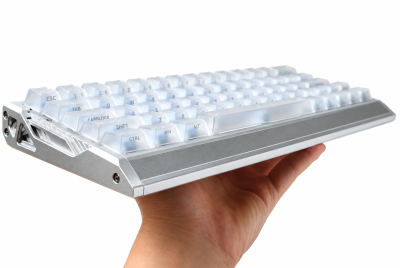
A 16-inch gaming laptop with an RTX 5090 was never going to be particularly light. The configuration I tested weighs close to 3kg, but I was surprised by how manageable it still felt in actual use.
I could pick it up one-handed without much trouble, and carrying it in a bag wasn't nearly as inconvenient as I expected for a machine with this much hardware inside. It obviously isn't competing with an ultrabook for portability, but that isn't really the point. What matters is that I can take what is essentially an extremely powerful gaming and editing workstation, close the lid and move the entire setup somewhere else.
That flexibility is probably one of the biggest reasons to consider the OMEN MAX 16. Someone who games but also regularly edits photos or videos doesn't necessarily need separate computers anymore. You can work at a desk, bring the laptop somewhere else and continue without giving up much performance.
The large power adapter does add more bulk when carrying the complete setup, but the laptop itself remains surprisingly reasonable considering what HP has managed to fit inside it.
An OLED Display That Makes The Performance Worth It
The 16-inch OLED display is one of the highlights of the OMEN MAX 16. It has a 2560 x 1600 resolution and refresh rate of up to 240Hz, which feels like a particularly good combination for this type of gaming laptop.

Colors are vibrant, blacks have the depth you expect from OLED and the panel gets bright enough that games and videos look excellent. There is enough contrast and detail that I sometimes found myself paying more attention to the scenery in a game simply because of how good everything looked.
The 240Hz refresh rate is also something you can genuinely notice. Movement feels smoother, particularly when playing games at high frame rates, and fast-moving objects become easier to follow. With an RTX 5090 capable of actually pushing games toward those frame rates, the high refresh rate doesn't feel wasted.
The Keyboard Is My Biggest Complaint
For me, the keyboard is probably the biggest downside of the OMEN MAX 16.

It has a 1,000Hz polling rate, which is excellent for gaming. Inputs feel extremely responsive, and if you're playing competitively while traveling or simply don't have a separate gaming keyboard available, the built-in keyboard is more than fast enough.
Typing is where I have more of a problem with it. The keys have a slightly tacky or almost sticky feeling to me, which becomes annoying during longer writing sessions. They aren't actually sticking, but there is something about the way the keys feel when pressing and releasing them that I personally don't enjoy.
Interestingly, I noticed the sensation much less while gaming. When I'm concentrating on movement and quick inputs, the keyboard feels fast and responsive rather than uncomfortable.
This is also one of the more subjective parts of the laptop. Someone else could use the same keyboard and have no issue with it at all, so I wouldn't necessarily consider it a reason to avoid the laptop without trying it first.
The RGB lighting, on the other hand, looks excellent. Color transitions are extremely smooth and vibrant, while the additional lighting along the bottom of the chassis adds just enough to make the laptop stand out. Put it on a desk in a darker room and it gives the whole setup a proper gaming look without needing a collection of external RGB accessories.
The Trackpad Is Excellent For Precise Work

The trackpad was another pleasant surprise.
Gaming laptops tend to assume that you will connect a mouse almost immediately, but the trackpad on the OMEN MAX 16 is responsive and surprisingly precise. Small movements are easy to control, which becomes particularly useful for photo and video editing where tiny cursor adjustments can matter.
And if you're somehow stuck without a mouse and become desperate enough, you could probably even attempt some gaming with it. I wouldn't recommend making that your permanent setup, but the tracking itself is accurate enough that it doesn't immediately feel impossible.
The RTX 5090 Is Fast, But The Cooling Is More Impressive
There isn't much mystery surrounding whether an RTX 5090 combined with a Core Ultra 9 290HX Plus is going to be fast.
The more interesting question is whether a 16-inch laptop can actually let those components run properly without cooking itself.
HP has built a substantial cooling system into the OMEN MAX 16, including a large vapor chamber and aggressive airflow. In my testing, it worked considerably better than I expected.
While playing War Thunder using the highest graphics settings and optimization settings I normally use, I was seeing roughly 270 FPS. The experience was extremely smooth, and paired with the 240Hz OLED display, the game looked excellent.

What surprised me more were the temperatures. Even while gaming or doing video-editing work, the laptop generally stayed around the 70°C range. I was expecting considerably more heat from a laptop running hardware this powerful, but temperatures remained remarkably controlled during my testing.
There is one very obvious tradeoff: the fans.
When the OMEN MAX 16 is pushed particularly hard — such as running War Thunder at the highest settings I tested — the fans can ramp up enough to sound like a jet engine. That level of noise isn't something I encountered constantly, though. Even in other fairly demanding games, the cooling system generally doesn't become quite as aggressive.
Considering how well the laptop keeps temperatures under control, I'm willing to accept the extra noise when it does happen. With headphones on, it becomes easy enough to ignore, and I'd rather have the cooling system ramp up when necessary than have the CPU or GPU reduce performance because of heat.
Based on the workloads I've thrown at it so far, the OMEN MAX 16 feels capable of handling almost anything a normal gamer or creator could realistically ask from it.
Based on the workloads I've thrown at it so far, this feels like a laptop that should be able to handle almost anything a normal gamer or creator could realistically ask from it.
Plugging It In Changes The CPU's Behavior
One thing I noticed during testing was how differently the Core Ultra 9 290HX Plus behaves depending on whether the OMEN MAX 16 is running on battery or connected to AC power.
During light everyday use on battery, I regularly saw CPU temperatures around 34°C to 38°C while the processor consumed approximately 5W. For a gaming laptop with this level of hardware, seeing temperatures in the mid-30s while browsing, typing or doing other basic tasks is actually extremely impressive.
Connecting the charger immediately changes that behavior. CPU power rose to roughly 20W even without me launching a particularly demanding workload, while clock speeds increased from around 0.59GHz on battery to approximately 3GHz to 4GHz.

The temperature increase was immediate, although in normal use I found the CPU generally settled closer to the 50°C to 60°C range rather than constantly sitting near 70°C. Temperatures around 70°C happened occasionally, but were much less common during lighter workloads.
At first, the sudden jump looked unusual, but the behavior itself isn't especially abnormal for a high-performance gaming laptop. Systems from other major gaming brands also tend to restrict CPU power and clock speeds much more aggressively on battery, then allow the processor to boost harder once AC power becomes available.
What stands out more to me is the other side of that behavior. When unplugged and doing normal everyday tasks, the OMEN MAX 16 can keep a flagship-class processor down around the mid-30°C range. Considering how powerful the hardware is, that level of efficiency is arguably more impressive than the temperature increase that occurs after plugging it in.
And even once connected to power, temperatures generally remained well controlled. Combined with my heavier gaming and editing tests, where sustained temperatures were also reasonable, the difference feels more like aggressive power management than a thermal problem.
OMEN Gaming Hub Actually Adds Something
I usually don't expect much from the software bundled with gaming laptops, but OMEN Gaming Hub turned out to be genuinely useful.
There are several performance settings available, including the new Unleashed Mode, which allows the laptop to push its performance even further. If your goal is simply getting as much speed as possible from the hardware, HP makes the process fairly straightforward rather than requiring you to dig through BIOS settings.

My main complaint is that enthusiasts don't get nearly as much control as they might want. There isn't the kind of freedom to undervolt or adjust every individual performance parameter that some people may be used to.
Personally, I would have liked that extra control, particularly because undervolting can sometimes be useful for balancing temperatures, noise and performance. But most users probably won't care. If you just want to select a performance mode and start gaming, OMEN Gaming Hub makes things relatively simple.
The Speakers Are Surprisingly Good
The speakers also caught me off guard.
They get loud without immediately becoming harsh or unclear, and there is considerably more bass than I expected from a gaming laptop. Gunshots have enough impact during games that the built-in speakers actually feel usable rather than something you tolerate until finding your headphones.
They're also good enough for casual music listening. The high end remains reasonably clear, bass has some presence and overall there wasn't the immediate urge to connect external speakers.
For a laptop where audio could easily have been treated as an afterthought, HP has done a surprisingly good job.
Battery Life Is Actually Usable
A laptop equipped with an RTX 5090 was never going to be an all-day battery machine, but I was pleasantly surprised by what I could get from the OMEN MAX 16.
During a mixture of typing, multitasking, photo editing and some casual gaming in Balanced mode, I was getting around four hours of battery life.
That's obviously nowhere near what you would expect from a thin productivity laptop, but for a machine this powerful, it feels reasonable. More importantly, it means the battery is actually useful. You can disconnect from the charger and get a meaningful amount of work done instead of treating the battery as something that only exists to move between outlets.
If you're using Performance or Unleashed Mode, though, you should already be plugged in. Those modes exist to let the hardware stretch its legs, and battery life naturally becomes much less important once you're trying to extract maximum performance.
Expensive, But Surprisingly Easy To Recommend
Nearly $4,700 is a lot of money for any laptop.
But the current high-end gaming market changes the context. RTX 5090 laptops can easily cross the $5,000 mark, so a machine combining an RTX 5090, Core Ultra 9 290HX Plus, excellent OLED display and genuinely capable cooling starts to look a little more reasonable than its price initially suggests.
And the performance isn't the only reason I like it. The OMEN MAX 16 works particularly well for someone who needs one computer for several different jobs. It can be a high-end gaming machine one moment, a photo or video-editing workstation the next, and then simply become a normal laptop that you close and carry somewhere else.
Despite weighing close to 3kg, the RTX 5090 version still feels manageable. I can comfortably pick it up with one hand, and for the amount of performance you're moving around, it never feels ridiculously cumbersome. That's an important distinction: it isn't super light, but it is surprisingly portable.

HyperX OMEN MAX 16 Final Verdict
The HyperX OMEN MAX 16 is one of those laptops that makes the distinction between gaming PC and mobile workstation increasingly difficult to define.
Its RTX 5090 and Core Ultra 9 290HX Plus combination offers more than enough performance for demanding games, photo and video editing, multitasking and almost anything else I could realistically throw at it. The 240Hz OLED display makes that performance look fantastic, while the cooling system was arguably the biggest surprise of the entire laptop, keeping temperatures around the 70°C range even under demanding workloads.
My biggest complaint remains the keyboard. I love how responsive it feels for gaming, but I don't particularly enjoy the slightly tacky sensation when typing. The black finish also requires more cleaning than I would like, since fingerprints appear extremely easily. If keeping the laptop looking clean is important, I would seriously consider the white version instead.
Enthusiasts may wish HP provided more manual performance controls.
But none of those issues change what the OMEN MAX 16 gets right. It delivers flagship gaming performance, excellent cooling, a beautiful display, surprisingly good speakers, a precise trackpad and usable battery life in a machine that is still manageable enough to regularly move around.
For someone who games, edits photos or videos and needs serious computing power without being tied to one desk, the HyperX OMEN MAX 16 is an easy laptop to recommend. The RTX 5090 version is obviously aimed at someone willing to spend heavily for maximum performance, but within today's increasingly expensive high-end laptop market, what HP is offering here makes a surprising amount of sense.
David is a tech enthusiast/writer who is often on the move, but since the pandemic is on a mission to explore gadgets to improve his 'home work'. This is a contribution to an ongoing IBTimes review series on gadgets for Home Productivity.
Frequently Asked Questions
Is The HyperX OMEN MAX 16 Good For Gaming?
Yes. The RTX 5090 configuration offers more than enough performance for demanding games, while the 240Hz OLED display allows the laptop to actually show extremely high frame rates.
In my War Thunder testing using the highest graphics settings and optimization settings I normally use, the OMEN MAX 16 was running at around 270 FPS while temperatures generally remained around the 70°C range.
Is The HyperX OMEN MAX 16 Good For Photo And Video Editing?
Yes. This is one of the areas where the OMEN MAX 16 makes the most sense beyond gaming.
The Core Ultra 9 290HX Plus, RTX 5090 and 32GB of DDR5 memory give the laptop plenty of performance for demanding creative workloads, while the OLED display and precise trackpad are particularly useful for photo and video editing.
It works well for someone who wants one machine for gaming, creative work and everyday productivity rather than maintaining separate computers.
How Much Does The HyperX OMEN MAX 16 Weigh?
The RTX 5090 configuration weighs 6.56 pounds, or approximately 2.98kg.
That is certainly heavy compared with a thin productivity laptop, but I found it surprisingly manageable for the amount of hardware inside. I could comfortably pick it up with one hand and regularly move it between different setups.
The large 460W power adapter will add considerably more weight if you're carrying the complete setup.
Does The HyperX OMEN MAX 16 Have An OLED Display?
Yes. The configuration tested here uses a 16-inch 2560 x 1600 OLED display capable of reaching up to 240Hz.
It also has a rated 0.2ms response time, 100% DCI-P3 color coverage, 500 nits of SDR brightness and up to 1,100 nits in HDR.
The OLED panel is one of the strongest parts of the laptop, particularly when combined with the extremely high frame rates the RTX 5090 can produce.
Does The HyperX OMEN MAX 16 Run Hot?
During my gaming and video-editing workloads, temperatures generally stayed around the 70°C range, which was considerably better than I expected from hardware this powerful.
The fans become extremely loud when the laptop is being pushed, but that aggressive cooling appears to work.
I did notice a significant temperature increase when connecting the charger during light use. CPU clocks rose from roughly 0.59GHz on battery to around 3GHz to 4GHz on AC power, while temperatures increased from around 34°C to roughly 60°C.
Does The Black HyperX OMEN MAX 16 Show Fingerprints?
Yes. The black finish on the model I tested picked up fingerprints very easily, particularly around areas that are touched frequently.
It doesn't affect usability, but anyone who wants their laptop to maintain a cleaner appearance without constantly wiping it down may prefer the white colorway.
What Is Unleashed Mode On The HyperX OMEN MAX 16?
Unleashed Mode is available through OMEN Gaming Hub and allows the laptop to push its hardware beyond the normal out-of-box performance limits.
It makes getting maximum performance relatively straightforward without requiring users to manually adjust numerous low-level settings.
Enthusiasts may still wish HP provided more freedom for things such as undervolting, but most users will probably appreciate the simpler approach.
How Long Does The HyperX OMEN MAX 16 Battery Last?
During my testing in Balanced mode, I got roughly four hours while mixing typing, multitasking, photo editing and some casual gaming.
That isn't comparable to an ultraportable productivity laptop, but it is respectable for a machine containing an RTX 5090 and Core Ultra 9 processor.
If you're using Performance or Unleashed Mode to get maximum performance, you should expect to have the laptop connected to its power adapter.
Is The HyperX OMEN MAX 16 Worth Buying?
For someone looking for a high-end gaming laptop that can also function as a powerful photo and video-editing workstation, yes.
The RTX 5090 configuration is extremely expensive, but it offers flagship gaming performance, excellent cooling, a beautiful OLED display and enough portability that the entire setup doesn't have to remain tied to one desk.
For buyers who don't need the maximum GPU performance available, lower-spec OMEN MAX 16 configurations may make more financial sense while retaining much of what makes the laptop appealing.
© Copyright IBTimes 2026. All rights reserved.
- Recommended For You