

Logitech Mobi Fold Hands-On Review: The First Foldable Mouse
This Foldable Logitech Mouse Might Be the Perfect Travel Companion
Portable mice have always required some degree of compromise. The models comfortable enough for an entire day at a desk usually create an awkward lump inside a laptop bag, while those small enough to disappear into a travel pouch can feel cramped or overly basic.
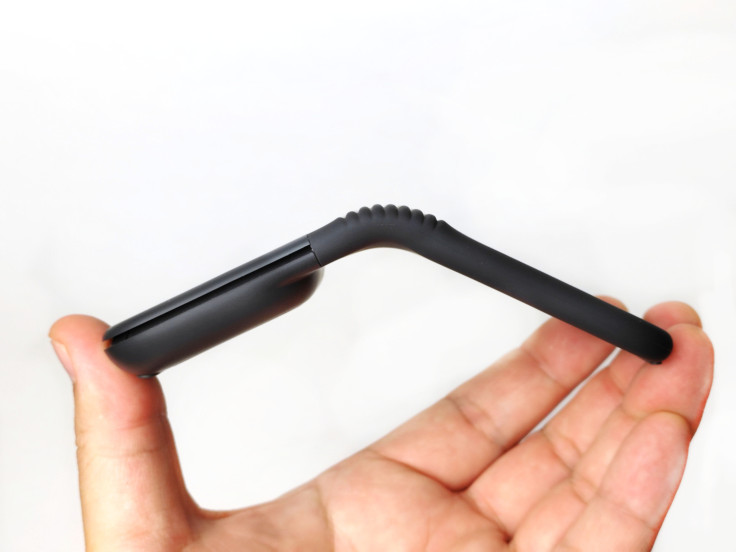
The Logitech Mobi Fold attempts to find a place somewhere between the two. This portable Bluetooth mouse folds nearly in half when it is time to travel, then opens into a curved shape that feels considerably more like a conventional mouse.
This is Logitech's first attempt at a foldable mouse. Rather than following Microsoft's approach of creating a mouse that snaps completely flat, Logitech designed the Mobi Fold to close across its middle, much like a foldable phone.
The result is a different approach to portability. Microsoft's Surface Arc Mouse prioritizes thinness, while the Mobi Fold prioritizes a smaller overall footprint.
After using the Mobi Fold across desks, mouse pads, clothing and other unconventional surfaces, I found that its unusual design is more than a visual novelty. The question is: does folding the mouse actually make it a better travel companion, or is it simply a fun mechanism in search of a problem?
Logitech Mobi Fold: Key Specifications
Connectivity: Bluetooth
Device switching: Up to three devices with Easy-Switch
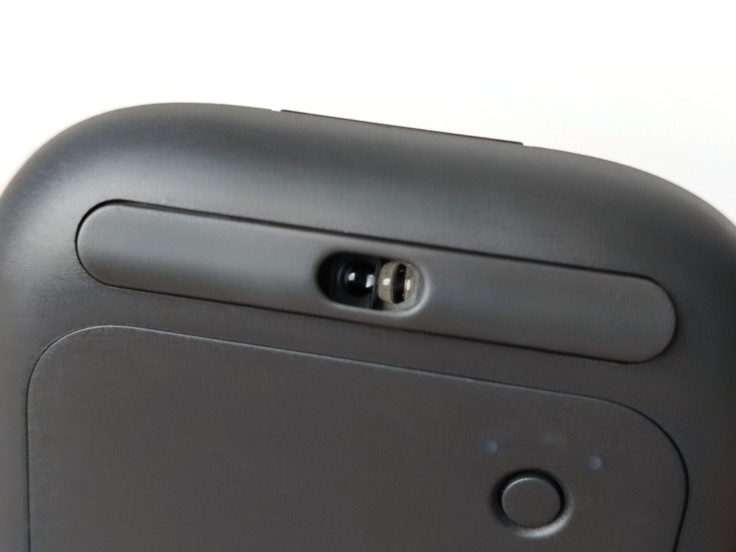
Sensor: Optical tracking
Sensitivity: Adjustable from 400 to 4,000 DPI
Scrolling: Adaptive Touch Scrolling
Buttons: Left click, right click and two customizable shortcut buttons
Charging: USB-C
Claimed battery life: Up to 30 days
Quick charging: Up to 22 hours from a one-minute charge
Power control: Automatically turns on when unfolded and off when folded
Software: Logi Options+ on Windows and mac OS
USB receiver: Not included with the standard consumer version
Logitech officially describes the Mobi Fold as its first ultra-portable foldable mouse, with quiet clicks, touch-based scrolling and Bluetooth switching between as many as three devices.
Pros
- Unique folding design creates a smaller footprint for travel
- Sturdy curved form when unfolded
- Accurate tracking across a wide variety of surfaces
- Exceptionally quiet clicks with clear tactile feedback
- Natural momentum from the touch-scrolling surface
- USB-C charging with up to 30 days of rated battery life
- Easy-Switch support for three Bluetooth devices
- Two customizable shortcut buttons
Cons
- Did not track successfully on the glass surface I tested
- Touch scrolling is not as smooth as a good trackpad
- Slight delay between touch input and onscreen scrolling
- Scroll direction may require a brief adjustment period
- $79.99 price is high compared with basic Bluetooth travel mice
Testing note: This review is based on extended hands-on use across wooden desks, conventional mouse pads, larger desk mats, clothing and glass. I also compared its tracking and scrolling directly with the Logitech MX Anywhere 3S.
Portable Folding Design
The closest comparison to the Logitech Mobi Fold is Microsoft's Surface Arc Mouse. Both products transform between a compact travel configuration and a raised shape intended for normal mouse use. Both also use that physical transformation to control their power.
The difference is in how they become compact.
Microsoft's Surface Arc Mouse snaps completely flat, producing a longer but exceptionally thin object that can slide against the side of a bag. The Mobi Fold instead folds across its middle, much like a foldable phone.
This creates a choice between thinness and footprint.
Microsoft's approach produces less thickness, while Logitech's design creates a shorter object that may fit more easily inside a small handbag, technology pouch or tightly packed suitcase.
Neither approach is automatically better for every traveler. Someone carrying a slim document case may prefer the Surface Arc Mouse. Someone trying to fit a mouse between chargers, cables and other accessories may appreciate the Mobi Fold's smaller folded footprint.
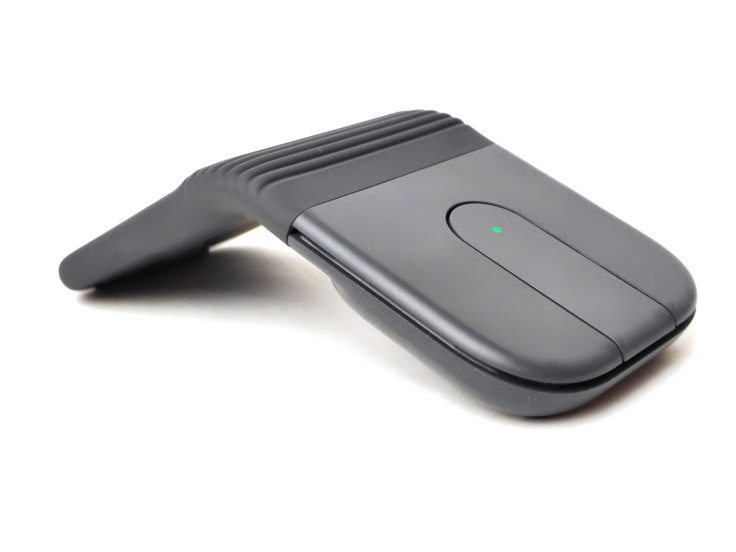
The Logitech design also feels reassuringly sturdy when opened.
Pressing down on the raised body does not cause the arch to collapse or flatten because the hinge closes in the opposite direction, bringing the front and rear sections together.
That explanation is based on how the mechanism behaved during my testing rather than a specific engineering claim from Logitech. In practical use, however, I never felt as though resting my hand on the mouse would accidentally force it out of shape.
Logitech says the Mobi Fold has been drop-tested, wrapped in a dust-resistant silicone exterior and equipped with an internal hinge rated for more than 15 years of daily use.
Its unusual appearance also attracts attention. The Mobi Fold is one of those small accessories that people notice when it appears on a table, particularly when they see it being opened or folded closed.
The Mobi Fold's unusually thin body also changes how the hand naturally settles around it. Because there is so little height beneath the palm, my ring and little fingers automatically curl around the outer edge of the mouse rather than resting beside it as they would with a conventional design. It is a strange sensation at first—and one I have never experienced with a standard mouse—although it becomes less noticeable with continued use.
It feels more like a fun gadget than a generic office peripheral, but the folding mechanism supports the practical design rather than distracting from it.
Automatic Power Control
There is no conventional power button on the Mobi Fold.
Unfolding the mouse automatically turns it on, while folding it completely closed switches it off. The two halves snap securely together, making the folding action itself feel like a natural replacement for a separate power switch.
It is a simple feature, but it makes sense for a travel accessory.
When the mouse is open, it is ready to work. When it is folded and placed inside a bag, it automatically conserves battery power.
This also eliminates one of the minor frustrations associated with portable accessories: remembering whether a small switch was turned off before placing the device back into a bag.
The action quickly became a natural part of using the mouse. I would unfold it when taking out my laptop, then fold it closed when packing everything away.
Tracking Performance on Different Surfaces
A portable mouse needs to work in places that were never designed to become offices.
It may be used on an airport table, hotel furniture, café counter or whatever other surface happens to be available. A travel mouse that performs reliably only on a conventional mouse pad would defeat much of its own purpose.
The Mobi Fold handled nearly everything I tried.
At one point, I found myself sitting on a high bar stool without access to a table. I balanced my laptop on one leg and used my other thigh as a makeshift tracking surface.
To my surprise, the Mobi Fold tracked accurately across the fabric of my pants.
Pointer movement remained predictable, without the skipping or erratic jumps I expected from using clothing as a mouse pad.
It performed equally well on wooden tables, conventional mouse pads and larger desk mats designed to sit beneath both a keyboard and mouse.
Logitech lists the Mobi Fold's optical tracking sensitivity as adjustable between 400 and 4,000 DPI. Although it is not intended to compete with a gaming mouse, its tracking felt precise enough for ordinary productivity work throughout my testing.
The one surface that caused trouble was glass.
Mobi Fold vs. MX Anywhere 3S on Glass
For comparison, I tested the Mobi Fold alongside the Logitech MX Anywhere 3S.
The MX Anywhere 3S uses Logitech's Darkfield tracking technology, which the company specifically advertises as capable of tracking on glass that is at least 0.16 inch (4 mm) thick.
When I placed the MX Anywhere 3S against a window, it continued to track. The Mobi Fold did not respond successfully on that same surface.
That does not necessarily mean the Mobi Fold will fail on every type of glass. My conclusion is limited to the window and glass surfaces available during testing.
It also does not make the Mobi Fold an unreliable travel mouse.
The mouse worked across practically every realistic surface I encountered, including one that was never intended to function as a mouse pad. However, anyone who regularly works on glass-topped desks or coffee tables should be aware that an alternative surface may be necessary.
Fortunately, this is one of the easiest limitations to overcome. A notebook, sheet of paper or almost any other opaque object can function as an improvised mouse pad.
Based on my experience, the Mobi Fold comes very close to being an anywhere mouse. It simply does not provide the same proven glass-tracking capability as the MX Anywhere 3S.
Quiet Clicks and Tactile Feedback
The left- and right-click buttons are among the Mobi Fold's best features.
Quiet mouse switches can sometimes feel soft or indistinct, as though reducing the noise also removed the physical confirmation of a click.
Logitech has avoided that problem here.
Each press produces a clear response beneath the fingertip. I can distinctly feel when the click has registered, but the sound itself is remarkably subdued.
I tested the mouse inside a closed office occupied by only two people. With almost no background noise in the room, the person sitting beside me could not readily hear my repetitive clicking.
Logitech officially describes the Mobi Fold as having quiet clicks and promotes it for shared environments such as cafés and libraries.
The company does not publish a specific decibel measurement for the buttons, so I would not describe them as literally silent. In my testing, however, they came impressively close without feeling soft or mushy.
The closest comparison I can make is to the quiet clicking mechanism used in Logitech's recent MX-series mice. One of Logitech's more impressive achievements with those models was reducing the sound without removing the tactile response that makes each click feel precise.
The Mobi Fold feels as though the same philosophy has been carried into a much smaller and more portable design.
Its quiet operation makes sense for the environments in which a travel mouse is likely to be used. It is discreet enough for airplane cabins, quiet libraries, shared offices and late-night workspaces while still providing enough feedback for confident clicking.
Office colleagues may also appreciate having fewer sharp mouse clicks repeating throughout the day.
Adaptive Touch Scrolling
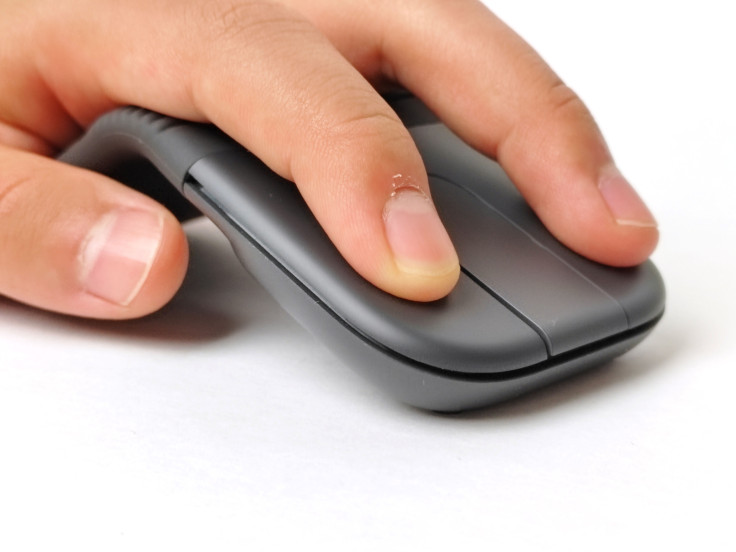
The Mobi Fold does not have a conventional scroll wheel.
Instead, it uses a touch-sensitive strip that Logitech calls Adaptive Touch Scrolling.
Moving a finger slowly across the surface provides controlled navigation, while a faster flick introduces momentum and sends a webpage or document farther down the screen. Logitech says the system moves between line-by-line and hyperfast scrolling according to the user's movement.
The momentum feels surprisingly natural.
A quick flick can send a page downward, while touching the strip again allows me to interrupt the movement when I reach the desired section.
With a little practice, I could move quickly through a long webpage and stop close to the place I wanted.
The Mobi Fold also has two physical shortcut buttons beneath opposite ends of the scrolling surface. They function as Forward and Back controls by default, but both can be customized through Logi Options+.
The controls can be reassigned to actions such as switching applications or taking screenshots rather than remaining limited to browser navigation.
This gives the small mouse more functionality than its minimal appearance initially suggests.
Touch Scrolling vs. a Trackpad
The Adaptive Touch Scrolling system works well, but it is also where I encountered the Mobi Fold's clearest first-generation limitation.
I had hoped the touch strip would produce the completely fluid scrolling associated with a good laptop trackpad.
Instead, I occasionally noticed a slight stagger in the onscreen movement. There also appeared to be a tiny delay between moving my finger and seeing the corresponding response on the screen.
This was a hands-on observation rather than a measured latency test, and the delay was brief. It became most noticeable when I compared the Mobi Fold directly with the MX Anywhere 3S.
The MagSpeed wheel on the MX Anywhere 3S feels more immediate, and smoother, particularly in its free-spinning mode.
The Mobi Fold's scrolling surface remains effective and generally enjoyable. Its momentum is particularly convincing, and being able to stop a moving page by touching the surface feels natural.
However, it does not yet completely recreate the responsiveness or fluidity of directly manipulating content through a trackpad.
I would like to see Logitech make the scrolling action smoother and more immediate in a future version.
Scroll Direction and Learning Curve
The touch surface also created an unexpected conflict between the way I use a mouse and the way I use a laptop trackpad.
With a conventional mouse wheel, I prefer traditional scrolling. When I use a two-finger gesture on a trackpad, however, I prefer natural scrolling—the phone-like behavior in which the content appears to follow the movement of my fingers.
The Mobi Fold sits somewhere between those two control methods.
My hand tells my brain that I am holding a mouse, but my finger is performing a swiping gesture across a touch-sensitive surface.
Initially, that mixed signal caused me to scroll in the wrong direction surprisingly often.
I would begin with the movement I normally associate with a trackpad, realize that the Mobi Fold was configured like a conventional mouse wheel and then have to correct myself.
Eventually, I stopped fighting that instinct and reversed the scrolling direction in Logi Options+.
After making that change, I stopped getting the direction wrong.
This learning curve will not affect everyone. Users who maintain the same scrolling direction across their mice and trackpads may never encounter it.
For me, however, it demonstrated that the Mobi Fold's scrolling system occupies an unusual middle ground between a physical mouse wheel and a touchpad gesture.
Fortunately, the problem was solved immediately through software customization.
Easy-Switch, Bluetooth and Logi Options+
Although the Mobi Fold is exceptionally compact, Logitech retained the multi-device connectivity found on many of its larger productivity products.
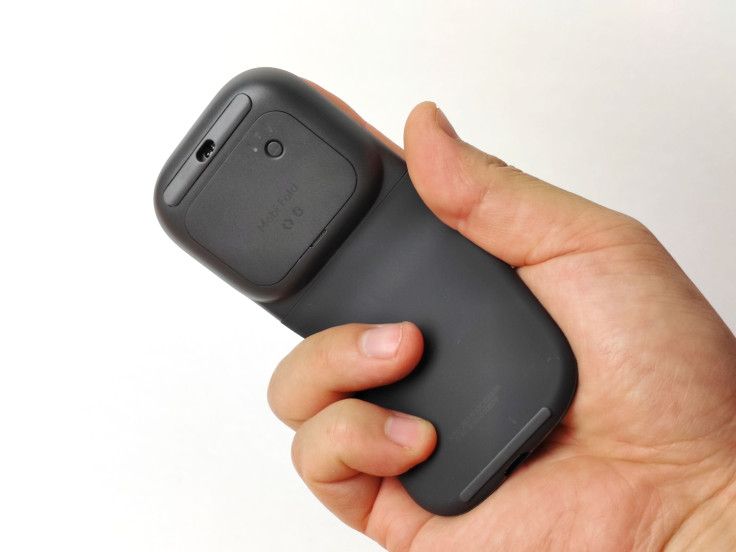
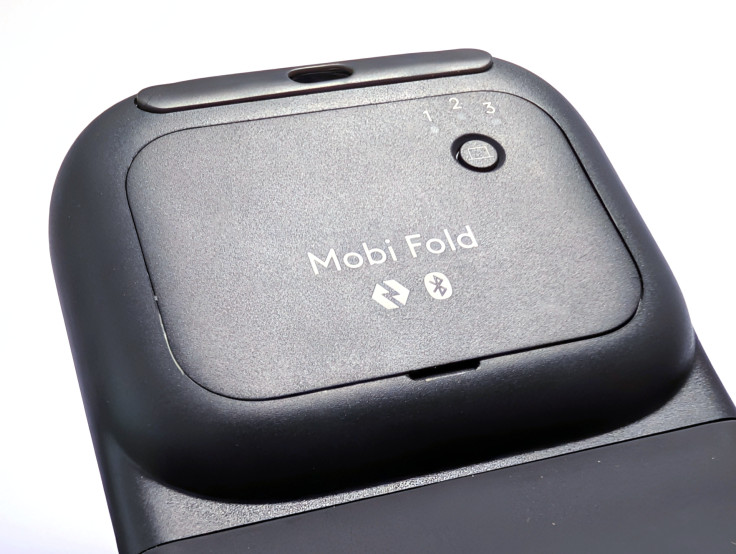
Easy-Switch allows the mouse to remain paired with up to three Bluetooth devices. A button on the underside makes it possible to move between a computer, tablet and another compatible device without repeatedly returning to Bluetooth settings.
This becomes especially useful when traveling with several devices.
The same mouse can be used for work on a laptop, navigation on a tablet and another compatible device without requiring a separate mouse for each one.
The Easy-Switch control is positioned on the underside, so changing devices requires lifting the mouse.
A top-mounted button would be faster, but placing it beneath the mouse keeps the upper surface clean and reduces the possibility of accidentally changing connections.
Full Logi Options+ support adds another level of customization on Windows and macOS.
The two additional buttons can be reassigned, the pointer sensitivity can be adjusted and the scrolling direction can be changed.
Not every user will need this degree of control, but its inclusion helps the Mobi Fold feel like a compact productivity tool rather than a basic Bluetooth accessory intended only for occasional travel.
The standard consumer Mobi Fold connects through Bluetooth and does not include a USB receiver.
Logitech also offers a separate Mobi Fold for Business that includes a Logi Bolt USB-C receiver. The two versions should not be confused when purchasing.
Battery Life and USB-C Charging
The Mobi Fold gets the power situation right.
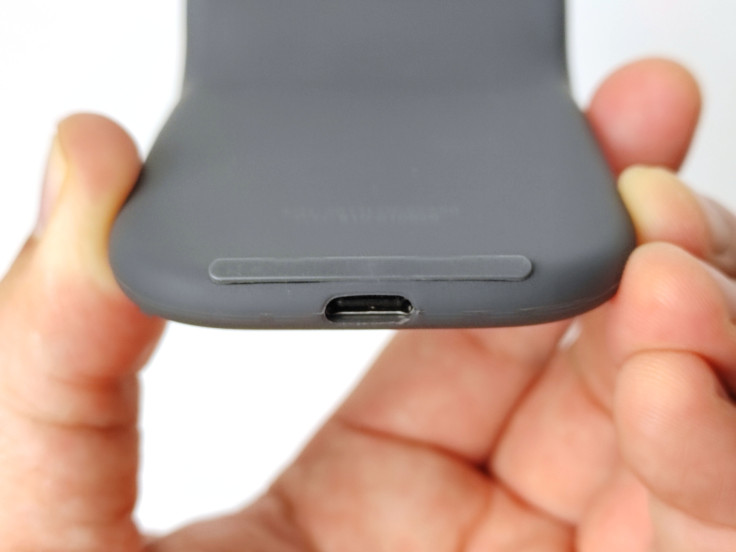
It charges through USB-C, allowing it to use the same type of cable carried for many current phones, tablets and laptops rather than requiring a proprietary charging connection.
A discreet battery indicator is integrated into the upper surface. It remains nearly invisible during normal use but becomes visible when the mouse is turned on or connected to power.
Logitech rates the consumer Mobi Fold for up to 30 days of use from a full charge.
The company also says a one-minute USB-C quick charge can provide up to 22 hours of use, although actual battery life will naturally depend on usage and computing conditions.
However, a rated month of use means charging should be an occasional concern rather than something a traveler needs to manage every day.
The automatic power controls should also help prevent the mouse from being unintentionally left on inside a bag.
Unlike the Keys-to-Go 2 keyboard, which runs on replaceable coin-cell batteries, the Mobi Fold uses an internal rechargeable battery. For this type of device, USB-C feels like the more convenient choice.
Most business travelers already carry at least one compatible cable, and a quick charge before leaving for a meeting or flight should provide more than enough power for the day.
Logitech Mobi Fold Final Verdict
The Logitech Mobi Fold answers the question raised at the beginning of this review more convincingly than I expected.
Its folding mechanism is not simply a visual gimmick. It creates a noticeably smaller footprint inside a handbag, suitcase or tightly packed technology pouch while allowing the mouse to open into a sturdy and usable curved form.
The optical sensor tracked accurately on nearly every surface I tested, including clothing, although it could not match the MX Anywhere 3S on the glass surface I tried.
The left- and right-click buttons are exceptionally quiet without feeling soft or mushy. USB-C charging, automatic power control and three-device Bluetooth connectivity also make sense for a modern travel mouse.
There are still compromises.
The touch-scrolling surface is not as smooth as a good laptop trackpad, and its response does not feel quite as immediate as the MagSpeed wheel on the MX Anywhere 3S. The unusual combination of a mouse body and a gesture-based scrolling surface may also require a short adjustment period.
However, those limitations feel secondary to what Logitech has achieved most successfully.
The Mobi Fold is not necessarily the mouse I would choose for an entire day at a permanent desk. A larger productivity mouse can provide a more substantial grip, additional controls and a more immediate scrolling experience.
For answering emails between meetings, working from an airport lounge or using a laptop in a hotel room, the Mobi Fold offers an unusually effective balance between portability and functionality.
Is it the best foldable travel mouse? The category remains small, and the answer will depend on whether someone values a thinner flattened design, glass tracking or a physical scroll wheel more highly.
For business travelers who prioritize a small packed footprint, quiet operation and multi-device flexibility, however, the Mobi Fold is one of the most interesting portable mice I have used.
Most importantly, it is no longer simply a novelty that happens to fold. It is a foldable mouse I would genuinely consider packing for a trip.
David is a technology enthusiast and writer who is often on the move and is on a mission to explore ways to make long-haul flights and business travel more enjoyable. This is a contribution to an ongoing IBTimes review series on gadgets for business travelers.
Frequently Asked Questions
Is the Logitech Mobi Fold rechargeable?
Yes. The Mobi Fold contains an internal rechargeable battery and charges through USB-C.
How long does the Logitech Mobi Fold battery last?
Logitech rates the Mobi Fold for up to 30 days of use from a full charge. The company also says a one-minute quick charge can provide up to 22 hours of use. Actual battery life will vary according to usage and computing conditions.
Does the Logitech Mobi Fold work on glass?
The Mobi Fold did not track successfully on the window and glass surfaces I tested. Logitech does not market it as a dedicated glass-tracking mouse.
By comparison, the Logitech MX Anywhere 3S is designed to track on glass that is at least 0.16 inch (4 mm) thick.
Does the Logitech Mobi Fold have a scroll wheel?
No. It replaces a conventional physical wheel with an Adaptive Touch Scrolling surface that responds to slower movements and faster momentum-based flicks.
Can the Mobi Fold connect to multiple devices?
Yes. Easy-Switch allows it to remain paired with up to three Bluetooth devices and switch between them using a control on the underside.
Does the Mobi Fold include a USB receiver?
The standard consumer Mobi Fold connects through Bluetooth and does not include a USB receiver.
The separate Mobi Fold for Business includes a Logi Bolt USB-C receiver in addition to Bluetooth connectivity.
How do you turn the Logitech Mobi Fold on and off?
There is no conventional power button. The mouse turns on automatically when unfolded and switches off when folded completely closed.
Can the Mobi Fold's scrolling direction be reversed?
Yes. The scrolling direction can be changed through the Point and Scroll settings in Logi Options+ on Windows and macOS.
Is the Logitech Mobi Fold suitable for all-day use?
The Mobi Fold is comfortable and capable for a travel mouse, but someone working for an entire day at a permanent desk may prefer a larger productivity mouse with a more substantial grip and physical scroll wheel.
It is best suited to mobile work, commuting and travel, where its smaller folded footprint becomes more valuable.
Logitech provided the Mobi Fold review unit at no cost. No payment was received, and Logitech had no editorial control over this review. All opinions and conclusions are based on my independent hands-on experience with the product.
© Copyright IBTimes 2026. All rights reserved.