

DuRoBo Krono Hands-on Review: A Phone-Sized E-Reader That Makes E Ink Feel Fast
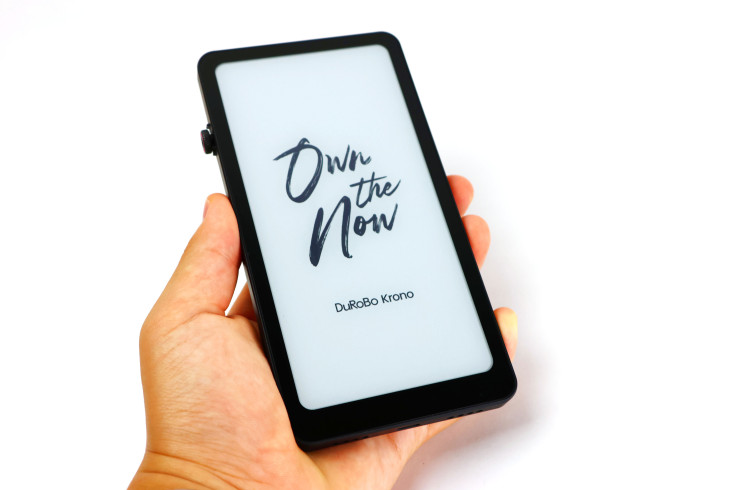
These days, there is very little that a smartphone cannot do. Between Kindle, Google Play Books and countless other reading apps, anyone carrying a phone already has access to more books than they could possibly finish, yet reading an entire novel on a conventional phone display is still very different from using a dedicated e-reader.
This is where the DuRoBo Krono takes an interesting approach. Instead of following the wider, tablet-like design of most e-readers, DuRoBo has made the Krono roughly the size of a smartphone, while still giving it an E Ink display, Android and a distinctive Smart Dial along the side.
After using the Krono mainly for books, with some occasional chatting and music playback, I found that the smaller form factor is one of its biggest strengths. It is comfortable to hold, easy to keep in a bag, and its fast E Ink refresh and Android flexibility make it feel less limited than a traditional reader.
PROS
- Compact phone-sized design
- Crisp E Ink display
- Fast refresh for an E Ink device
- Speed, Clarity and Quality display modes
- Smooth Smart Dial with haptic feedback
- Android app support
- Excellent battery life
- Bright, adjustable front light
- Comfortable for long reading sessions
- Moodi remote works well for page turning
- First-party TPU case fits closely
CONS
- Quality mode is not available in every app
- Quality mode can feel slower when typing quickly
A Phone-Sized E-Reader
The first thing I noticed about the Krono was just how much it feels like holding a phone. Its narrow proportions sit naturally in one hand, and compared with a wider e-reader, it feels considerably easier to hold for an extended period. Despite the smaller screen, there is still enough text on each page that I never felt the size was getting in the way of reading.
That compact design also makes a difference when carrying it around. I normally keep the Krono in my bag, and because it takes up so little room, I tend to bring it even when I am not specifically planning to read. The device itself also feels solid, while the black finish gives it a clean and premium appearance without adding unnecessary bulk.
A Crisp E Ink Display
The Krono's E Ink display has been one of the strongest parts of the experience. Text looks crisp and clear, with individual pixels becoming difficult to notice during normal reading, which helps give books a more paper-like appearance than they have on a conventional phone or tablet.
It also performs very well in bright environments, where the screen remains easy to read rather than becoming washed out. For darker environments, the front light gets extremely bright and also lets me adjust the color temperature, so I can move from a whiter light during the day to something warmer at night.
Speed, Clarity And Quality Modes
DuRoBo gives the Krono three E Ink display modes called Speed, Clarity and Quality, and I actually find myself switching between them depending on what I am doing. Clarity is my usual choice for books because it keeps text sharp without making page turns feel slow, while Quality is especially useful when I need smaller lettering to look as clear as possible.
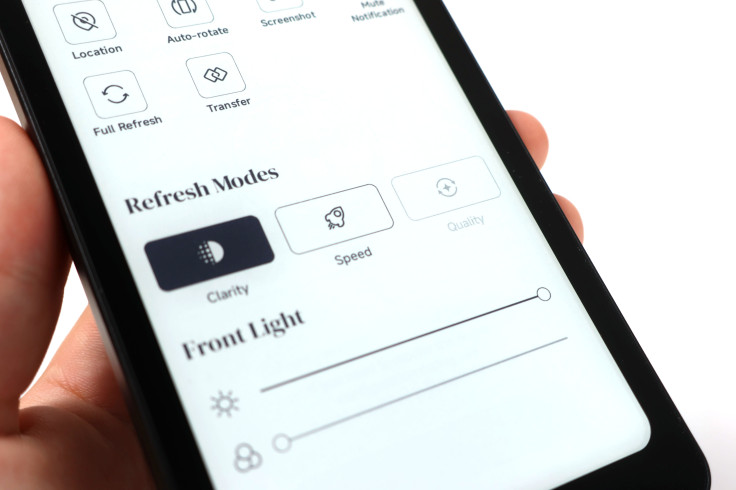
Speed mode makes more sense when I am scrolling through Android apps or doing something more interactive. The Krono still behaves like an E Ink device, but the faster setting keeps it from feeling unnecessarily sluggish. Page turns are also pretty quick, and the device wakes in roughly one second, so getting back into a book rarely involves much waiting.
The Smart Dial Is Surprisingly Useful
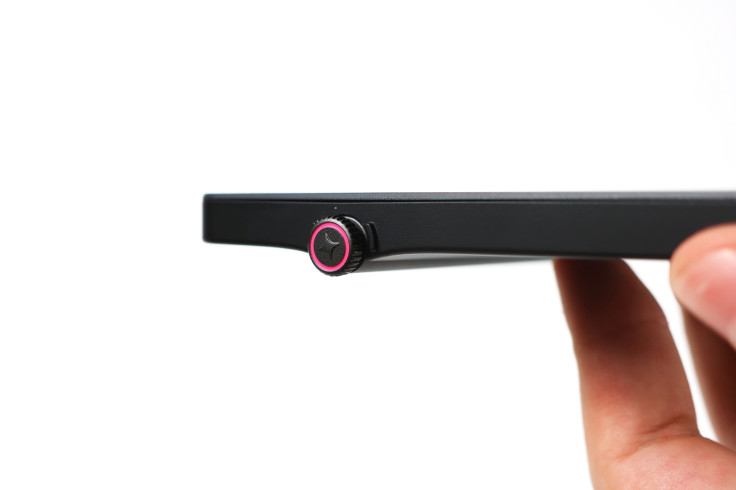
The Smart Dial along the side of the Krono initially looks like the kind of feature that could easily become a gimmick, but I ended up using it regularly. The dial turns very smoothly, and scrolling with it feels more convenient than repeatedly swiping across the E Ink touchscreen.
The haptic feedback is what makes it particularly satisfying. Each movement produces a noticeable tactile response, giving scrolling a more precise physical feel while also keeping my finger away from the display. Once I became accustomed to it, using the dial became a natural part of navigating the Krono rather than something I had to remember was there.
Made For Longer Reading Sessions
Books are still where the Krono makes the most sense. Its narrow body is comfortable enough to hold in one hand for a long time, and the screen shows enough text that the phone-sized form factor does not feel cramped.
The E Ink display also makes it easier for me to focus on reading than when I use a smartphone. Even though Android apps are available, the overall experience feels less visually distracting, and once I get into a book, I am much less tempted to start jumping between unrelated apps.
Around Two Weeks Of Battery Life
Battery life has been excellent in my use. With roughly two hours of reading per day, I generally only need to charge the Krono about once every two weeks, although heavier use of Android apps, the front light or audio will naturally affect that figure.
That long endurance works particularly well with the compact design. I can leave the Krono in my bag, use it throughout the week and rarely think about whether I remembered to charge it, which is exactly how I want an e-reader to behave.
DuRoBo's TPU Case
I have also been using DuRoBo's own TPU case, which fits the Krono very closely. The grooves and openings line up where they should, while the TPU adds some extra grip and protection without making the device feel substantially larger.
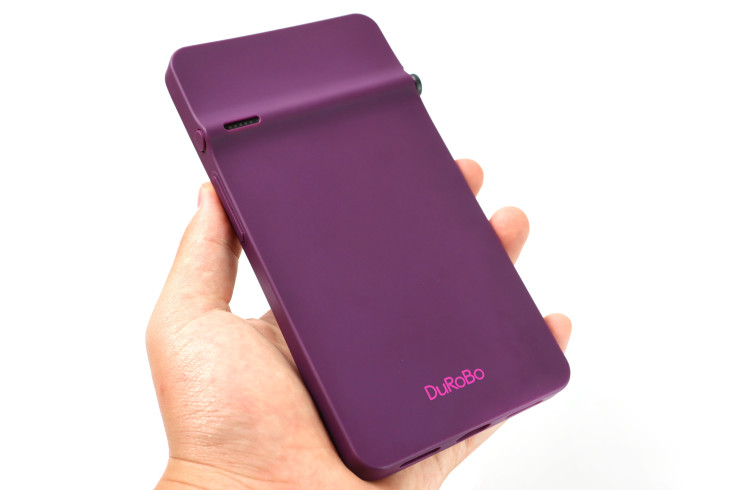
Importantly, the case also leaves the Smart Dial easy to use. Since the compact dimensions are one of the main reasons I like the Krono, it is good that the first-party case adds protection without taking away from that advantage.
The Moodi Remote
DuRoBo also makes the Moodi, a small Bluetooth remote that I use mainly for turning pages. Rather than reaching toward the Krono every time I reach the bottom of a page, I can leave the device in a comfortable position and keep the Moodi in one hand.
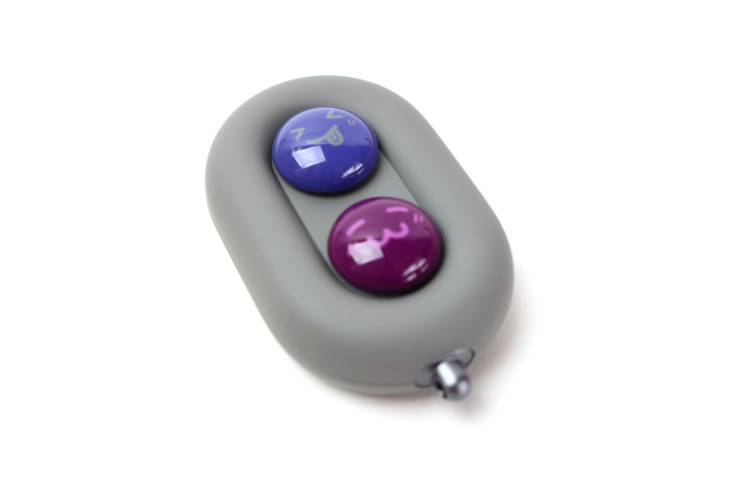
The remote has a soft feel that makes it pleasant to hold, while the buttons produce a loud and satisfying click that can be felt as well as heard. It is a simple accessory, but during longer reading sessions, being able to turn pages without touching the Krono makes the experience noticeably more relaxed.
Why The Size And Speed Matter
After spending time with the Krono, the two features that stand out most are still its size and its refresh speed. The phone-sized body makes it far easier to carry and hold than a larger e-reader, while the quicker display modes make Android and general navigation feel practical rather than frustrating.
The rest of the device supports those strengths well. The crisp screen keeps books comfortable to read, the Smart Dial makes scrolling easier, Android adds flexibility, and the long battery life prevents the Krono from becoming another device that needs constant charging. Add the Moodi and case, and the overall package feels particularly well suited to someone who reads frequently while on the go.
Final Verdict
The DuRoBo Krono works because it takes the qualities I already like about E Ink and puts them into a form factor that is easier to carry every day. Its phone-sized body is comfortable enough to hold for long reading sessions, while the crisp display, bright front light and multiple refresh modes keep the smaller screen from feeling like a major compromise.
The Smart Dial is another highlight, with its smooth scrolling and haptic feedback making it genuinely useful rather than decorative, while Android gives the Krono enough flexibility for chatting and other apps without taking away from its primary role as an e-reader. Battery life has also been excellent, with around two weeks between charges when I am reading for roughly two hours each day.
The Moodi remote and DuRoBo TPU case round out the experience nicely, particularly for someone who wants a complete portable reading setup. The Moodi makes page turning more comfortable during longer sessions, while the case protects the Krono without sacrificing the slim design or interfering with the Smart Dial.
For someone who primarily wants to read but still appreciates occasional access to Android apps, the Krono occupies an interesting middle ground between a traditional e-reader and a smartphone. The simplest description is still the one that fits it best: the DuRoBo Krono is a phone-sized e-reader that is fast, comfortable and easy on the eyes.
David is a tech enthusiast/writer who is often on the move, but since the pandemic is on a mission to explore gadgets to improve his 'home work'. This is a contribution to an ongoing IBTimes review series on gadgets for Home Productivity.
Frequently Asked Questions
Is the DuRoBo Krono a phone or an e-reader?
The DuRoBo Krono is primarily an E Ink e-reader, although its narrow proportions make it feel much closer to holding a smartphone than a traditional e-reader. Android support also allows it to run compatible apps beyond reading software.
Is the DuRoBo Krono good for reading books?
Yes. Books are what I use it for most, and the compact body is comfortable during long reading sessions while still displaying enough text on each page.
Can you install Android apps on the DuRoBo Krono?
Yes. Android support allows the Krono to access compatible reading, communication and other apps rather than being restricted to a single e-book ecosystem.
How fast is the DuRoBo Krono's E Ink display?
It feels quite fast for an E Ink device. Page turns are quick, while Speed mode makes scrolling and more interactive Android apps noticeably more responsive.
What are Speed, Clarity and Quality modes?
The three modes change the balance between refresh speed and image clarity. I generally use Clarity for reading, Quality for particularly small text and Speed for more interactive applications.
What does the Smart Dial do?
The Smart Dial provides a physical way to scroll and navigate without repeatedly swiping the screen. It also has haptic feedback, which makes scrolling feel more precise and satisfying.
How long does the battery last?
With around two hours of reading each day, I generally charge the Krono about once every two weeks, although battery life will vary with heavier app, lighting and audio use.
What is the DuRoBo Moodi?
The Moodi is a Bluetooth remote that I primarily use for turning pages. It has a soft-touch feel and satisfyingly clicky buttons, making it particularly convenient during longer reading sessions.
Is DuRoBo's TPU case useful?
Yes. It adds grip and protection without significantly increasing the size of the Krono, and the Smart Dial remains easy to access while the case is installed.
Who is the DuRoBo Krono best for?
The Krono is best suited to someone who primarily wants a compact, comfortable e-reader but also values Android flexibility for occasional chatting and other apps.
© Copyright IBTimes 2026. All rights reserved.