

IQUNIX EV63 Hands-On Review: A Premium Hall Effect Keyboard Built for Speed

Gaming keyboards have spent years trying to become faster. We've gone from mechanical switches to optical switches, higher polling rates, adjustable actuation and now Hall Effect keyboards that can register incredibly small movements from each key.
But there comes a point where putting another impressive number on the specifications sheet doesn't necessarily make someone a better player. Unless you're competing professionally, is there really a noticeable difference between an already fast gaming keyboard and something built around 0.01mm Rapid Trigger sensitivity?
That's what makes the IQUINX EV63 interesting. It certainly has the numbers to compete with serious esports keyboards, but IQUNIX has wrapped that performance inside a heavy aluminum chassis with frosted translucent keycaps and a design that looks more like something from 2030 than another RGB-covered gaming peripheral.
After using the EV63 for both gaming and everyday typing, I found the performance advantage more noticeable than I initially expected. There is a learning curve, and its wired-only design creates an unusual limitation for such a compact keyboard, but once everything clicks, this is one of those keyboards that is genuinely difficult to put down.

IQUNIX EV63: Key Specifications
Layout: 60% ANSI, 64 keys
Switch type: Hall Effect magnetic
Switch options: Magnetic X Pro / Magnetic X Ultra
Polling rate: 8,000Hz
Scanning rate: 16,000Hz
Rated latency: 0.125ms
Rapid Trigger sensitivity: 0.01mm
Adjustable actuation: Starting from 0.01mm
Software: Web-based EV Software
Connectivity: Wired USB-C
Case: CNC-machined aluminum, with forged carbon fiber on selected versions
Keycaps: Double-shot PBT or frosted translucent PC depending on model
Hot-swappable: Yes, compatible magnetic switches
Weight: Approximately 1,206g
IQUNIX lists the EV63 with an 8,000Hz polling rate, 16,000Hz scanning and Rapid Trigger sensitivity down to 0.01mm. The keyboard is also completely wired and uses IQUNIX's browser-based software rather than requiring a conventional desktop application.
Pros
- Extremely responsive Rapid Trigger performance
- Premium aluminum construction
- Excellent frosted translucent keycaps
- Clean futuristic design
- Magnetic switches feel great for both gaming and typing
- Powerful browser-based customization
- Multiple profiles make switching between gaming and work easy
- RGB lighting is beautifully diffused by the keycaps
Cons
- Compact layout requires a noticeable typing adjustment
- No Bluetooth or wireless connectivity
- Some reactive RGB animations feel unfinished
- Ultra configuration reaches premium keyboard pricing
Testing note: This review is based on extended hands-on use of the IQUNIX EV63 for both gaming and everyday typing. I used the keyboard long enough to move beyond its initial typing learning curve, which took approximately two weeks before the smaller layout began to feel completely natural.
A Premium Keyboard With A Futuristic Look
Gaming keyboards can sometimes look like they were designed under the assumption that more RGB automatically equals better design. The EV63 takes almost the opposite approach, looking surprisingly minimalist from a distance before revealing more of its details the closer you get.
It has what I can only describe as a "2030" look. The shape is clean and futuristic without becoming overly complicated, and the aluminum alloy construction immediately gives the EV63 the kind of solidity expected from a much more expensive custom keyboard.

The weight also helps create that impression. At around 1.2kg, the EV63 certainly isn't light for something this small, but it never became particularly difficult to pick up and move around.
Instead, the density makes the keyboard feel reassuringly substantial. Put it on a desk and there is very little about it that feels cheap, hollow or temporary, and it gives the impression that it could survive years of fairly aggressive gaming.
Frosted Keycaps Are The Design Highlight
The keycaps may be my favorite visual part of the EV63. IQUNIX has managed to find an unusual middle ground between completely transparent gaming keycaps and traditional opaque designs.
The frosted translucent finish allows you to partially see the switches underneath, but everything is softened through a matte layer. Instead of looking like exposed plastic components, the switches almost become another part of the visual design.

The side-mounted legends initially looked like they might create another usability problem. Coming from keyboards where the letters are directly on top, I expected myself to be constantly tilting my head forward trying to identify unfamiliar keys.
In practice, it was barely an issue. The legends remained easy to see, and after using the EV63 for a while I stopped consciously noticing that they were positioned differently.
The advantage is that the tops of the keycaps remain almost completely clean. Combined with the aluminum chassis and translucent finish, it gives the EV63 a minimalist appearance that would look just as natural on a carefully designed workstation as it would beside a gaming PC.
Typing Takes About A Bit To Get Used To
The EV63 itself did take considerably more adjustment. I already use another compact keyboard, so I assumed moving to another 60% layout would be relatively painless, but somehow the EV63 immediately felt smaller beneath my fingers.
During the first few days, my typing accuracy noticeably dropped and I found myself hitting neighboring keys more frequently than usual. It took roughly two weeks before my muscle memory finally adjusted enough that I could type without consciously thinking about the smaller layout.
Once that happened, the experience changed considerably. What initially felt cramped eventually became natural, and the switches themselves made the EV63 enjoyable enough that I began appreciating it as a typing keyboard rather than something I would tolerate only because of its gaming performance.
This is worth keeping in mind if someone tries the keyboard for 15 minutes and immediately decides it feels too small. Compact keyboards are heavily dependent on muscle memory, and in my experience the EV63 needs considerably longer than a quick demo before giving its best impression.
Somewhere Between Creamy And Clicky
Hall Effect keyboards don't always have the best reputation for sound, particularly when performance is clearly the priority. IQUNIX's magnetic switches surprised me because they manage to fall somewhere between what keyboard enthusiasts usually describe as "creamy" and clicky.

There is a smooth and relatively full sound as each key travels downward, but enough definition remains that individual presses don't become muted or mushy. It gives the keyboard a satisfying character during longer typing sessions while retaining the crisp response I want when playing games.
For me, this may be one of the EV63's most important qualities. A gaming keyboard can have incredible specifications, but if typing thousands of words on it feels terrible, I am eventually going to replace it with something else whenever I'm not gaming.
The EV63 doesn't create that problem. Once I adapted to the layout, I could comfortably move between gaming and normal work without feeling as though the switches were optimized so aggressively for one purpose that they compromised the other.
Rapid Trigger Makes A Noticeable Difference
Then there is the feature people are probably buying the EV63 for: Rapid Trigger.
Unlike a conventional mechanical keyboard where a key has a fixed actuation and reset point, Hall Effect switches can determine how far the key itself has moved. The EV63 can consequently reset a key according to that movement, with IQUNIX advertising Rapid Trigger sensitivity down to 0.01mm.
What surprised me is how quickly this stopped feeling like a specification and started affecting actual gameplay. Movements feel extremely responsive, particularly when repeatedly switching between opposite directions or needing to stop immediately before performing another action.
Changing direction during a jump is a good example. The EV63 responds almost immediately to the change in input, making rapid corrections feel cleaner and easier to execute than on a more conventional keyboard.
Quick stops have the same benefit. There is simply less sensation that I am waiting for the previous key to physically reset before the next movement can begin, which makes the keyboard feel almost directly connected to what my fingers are trying to do.
Will that suddenly turn someone into an esports professional? Obviously not, and there is probably a point where the player's reaction time becomes far more important than another fraction of a millimeter of keyboard sensitivity.
However, for someone who wants to play at a competitive level the EV63 definitely feels like appropriate equipment. It is responsive enough that I can't imagine the keyboard being the thing holding a skilled player back.
Web-Based Software Is Surprisingly Powerful
I also expected IQUNIX's web-based software to be one of the compromises. Browser-based peripheral tools can sometimes feel like simplified versions of a proper desktop application, with just enough controls to put "programmable" somewhere on the box.
The EV software turned out to be considerably more comprehensive. Actuation and Rapid Trigger settings can be customized, keys can be remapped, lighting can be adjusted, and the keyboard includes presets that provide a useful starting point for users who don't yet know how they want their Hall Effect switches configured.
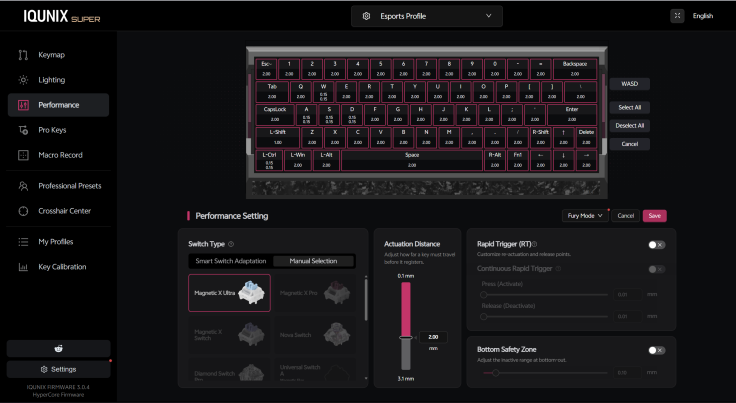
There are even configurations based around competitive esports use. That is useful because giving someone dozens of adjustable values isn't particularly helpful if they have no idea what any of those values should be.
More importantly, there is no giant peripheral application that needs to remain installed just to adjust the keyboard. Open the browser interface when something needs changing, configure it and get back to using the keyboard.
Three Profiles Make It More Than A Gaming Keyboard
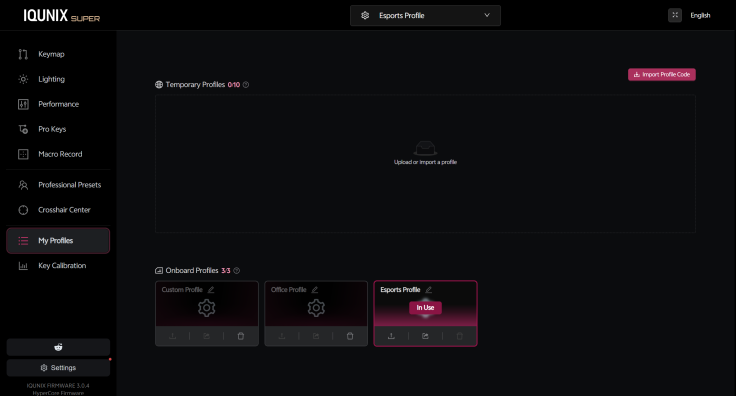
The problem with an extremely sensitive gaming keyboard is that the setting you want for a competitive FPS is not necessarily what you want while writing an email. Accidentally registering a key because your finger moved a tiny fraction downward becomes considerably less impressive when the result is a page full of typos.
IQUNIX's solution is to make changing configurations extremely easy. The EV63 supports quick access to Custom, Office and Esports profiles, allowing a more sensitive setup to be used for gaming and a more conventional configuration for typing.
That feature became much more useful than I expected. Rather than finding one compromise setting that was acceptable for everything, I could allow the EV63 to become extremely responsive during gaming and then switch back when I needed to work.
For someone using one computer for gaming and productivity, this makes Hall Effect customization considerably more practical. You get to take advantage of the technology when it matters without forcing yourself to type on esports-level sensitivity for the rest of the day.
The RGB Looks Better Than The Effects Behave
The translucent keycaps also completely change the EV63's RGB lighting. Instead of having bright LEDs firing directly into your eyes every time you glance down, the frosted plastic diffuses the light across each key.
The effect is much softer and cleaner than the RGB implementation on many gaming keyboards. Colors remain vibrant enough to make the keyboard visually interesting, but they don't overpower the design or make the EV63 look like a flashy gaming accessory sitting on the desk.

Unfortunately, not every animation is as polished as the physical lighting.
On some reactive color settings, I noticed that the current lighting pattern can appear to get cut off when another key is pressed. Rather than smoothly completing or transitioning out of the previous animation, it can instantly jump to the color associated with the next keypress.
It doesn't interfere with gaming and can easily be avoided by choosing a different effect. However, when the rest of the EV63 feels this polished, small software details like this become considerably easier to notice.
The hardware side of the lighting is excellent. The animations themselves could use another round of refinement.
No Bluetooth Is The Biggest Everyday Compromise
There is one missing feature that surprised me more than anything else: Bluetooth.
From an esports perspective, I understand the decision completely. Someone buying an 8,000Hz Hall Effect keyboard because they care about every possible bit of input latency is probably going to connect it with a cable anyway, and IQUNIX explicitly lists the EV63 as wired-only.

The problem is that the EV63 is also a very small keyboard. Its dimensions make it look like the kind of device you could easily throw into a bag, bring to another desk or quickly use alongside a laptop.
Having to bring the cable makes that compactness slightly less useful. Someone who games professionally probably won't care, but a more casual gamer who also wants to use the EV63 for office work may find the lack of wireless connectivity much harder to overlook.
That is especially noticeable because the switches became enjoyable enough for me to want to use the keyboard outside of gaming. Bluetooth would have transformed it from an exceptional dedicated gaming keyboard into something considerably more versatile.
Pro Or Ultra?
Then there is the price.
The EV63 isn't inexpensive, particularly with the more premium configurations. The Silver Knight and Dark Knight models are listed around $189 with Magnetic X Pro switches, while moving up to Magnetic X Ultra takes the top configurations to approximately $209.
For most people, I think the Pro configuration makes more sense. You still get the aluminum construction, Hall Effect technology, Rapid Trigger and the core performance that makes the EV63 impressive, while keeping the price below the $200 mark.
Someone primarily playing games casually doesn't necessarily need to chase every possible improvement in magnetic stability or switch performance. At $189, the Pro is already an expensive keyboard, but the construction quality and gaming performance make that price considerably easier to understand once you actually hold it.
The Ultra is for the player who knows exactly why they want it. If you're already optimizing actuation distance, Rapid Trigger behavior and every other part of your competitive setup, spending the additional $20 for the higher-end switches isn't an unreasonable upgrade.
For everyone else, I would put the extra money toward another part of the setup. The Pro already delivers the majority of what makes the EV63 such an enjoyable keyboard.

IQUNIX EV63 Final Verdict
The IQUNIX EV63 initially looked like another keyboard built around increasingly extreme gaming specifications. After using it extensively, however, its 0.01mm Rapid Trigger sensitivity became something I could genuinely feel in-game rather than just another number on the product page.
Movement is exceptionally responsive, rapid directional changes feel clean and separate gaming and typing profiles make that sensitivity more practical for everyday use. The aluminum construction, frosted keycaps and magnetic switches also give the EV63 a premium feel that many gaming keyboards lack.
There are some compromises. The compact layout took me roughly two weeks to adapt to, there is no Bluetooth connection and some reactive RGB effects still need more polish.
For most buyers, the Magnetic X Pro configuration should be enough. Competitive players may prefer the Ultra version, but both deliver the responsive performance and build quality that make the EV63 stand out.
The EV63 isn't ideal for wireless productivity, but for anyone wanting a fast, premium Hall Effect gaming keyboard with an unusually distinctive design, it is an easy recommendation.
David is a tech enthusiast/writer who is often on the move, but since the pandemic is on a mission to explore gadgets to improve his 'home work'. This is a contribution to an ongoing IBTimes review series on gadgets for Home Productivity.
Frequently Asked Questions
Is The IQUNIX EV63 Wireless?
No. The IQUNIX EV63 is a wired-only keyboard and connects through USB rather than Bluetooth or a 2.4GHz wireless receiver.
For competitive gaming this makes sense, but users looking for a compact keyboard that can easily move between laptops and other devices may find the lack of wireless connectivity limiting.
Does The IQUNIX EV63 Have Rapid Trigger?
Yes. IQUNIX rates the EV63 for Rapid Trigger sensitivity down to 0.01mm, with adjustable Hall Effect actuation settings.
In my testing, the responsiveness was particularly noticeable during rapid directional changes and quick stops in games.
Is The IQUNIX EV63 Good For Typing?
Yes, although the compact layout took me approximately two weeks to fully adjust to. Once that adjustment period was over, the magnetic switches offered an enjoyable balance between a smooth, creamy sound and a more defined keypress.
The ability to switch away from highly sensitive gaming configurations also makes the EV63 considerably easier to use for normal typing.
What Is The Difference Between EV63 Pro And Ultra?
EV63 configurations are available with Magnetic X Pro and higher-end Magnetic X Ultra switches, with the Ultra versions carrying a price premium. Current Silver Knight and Dark Knight configurations sit around $189 with Pro switches and can reach approximately $209 with Ultra switches.
For most casual and enthusiast gamers, the Pro should provide the important EV63 experience. The Ultra makes more sense for competitive players willing to spend extra to maximize the performance of their setup.
Does The EV63 Require Software To Be Installed?
No conventional desktop application needs to be installed for its main customization functions. IQUNIX provides a web-based EV configuration tool for changing keyboard settings.
This includes performance profiles, actuation-related settings, key customization and lighting controls.
© Copyright IBTimes 2026. All rights reserved.